The Problem
Access to the parking lot of our housing estate is guarded by a gate.
It can be opened in two ways: with a remote or by calling a special phone number. The gate checks whether the calling number is on a list stored in its memory – if it is, the gate opens.
This works great for the people who live here. It’s worse with guests: their numbers aren’t on the list, so I have to open the gate for them. While waiting for guests to arrive, you have to keep your phone close and watch for messages from them, so that you can open the gate reasonably quickly.
The list of numbers in the controller is managed by the housing cooperative. Getting a number added quickly is near impossible.
The remote also has a fairly limited range: to transmit the signal, you have to be relatively close. So you have to drive up to the gate, stop, wait for it to open, and only then drive on.
In practice, when driving home, I used the phone option. Over time I got so good at it that I knew that after the bend, halfway to the speed bump, I had to press the dial button so that the gate would finish opening exactly when I reached it.
It had one major downside, though: the loud dialing tone and the message that the gate had rejected the call. I never remembered to mute my phone, and it was annoying. Especially when someone on board had just fallen asleep and I was hoping for a successful transfer to the bed and a quiet evening.
So I started tinkering.
Solutions
I knew I wanted something that would let me open the gate quietly, from a distance.
The first thing I thought of was reverse engineering the remote. I even found the documentation for the chip inside it. It turned out, however, that it transmits a different code every time (a so-called rolling code), so a simple replay attack – capturing a signal and re-sending it – was out of the question. I think that when a remote is registered, some secret is established and stored in the memory of both the remote and the controller, and the subsequent codes are calculated from it. Without access to the controller, making an extra remote wasn’t that straightforward.
It also crossed my mind to use the original remote and build some electronics that would “press” its button. But there was another big problem: the gate is quite far from our apartment. So far that the signal from the remote has no chance of reaching it at all – not without extra modifications boosting its power.
So the idea of radio control was dropped.
Fortunately, there was one more way: by phone.
I’ve had a VoIP number from ipfon.pl for years. I registered it with the cooperative as a number that opens the gate. I also found a great Home Assistant add-on, ha-sip, which can call the controller’s number over SIP.
This way I got a button in Home Assistant that quietly calls the gate and opens it. Half of the problem solved!
All that was missing was something I could send to a guest that works without logging in, without an app, and only for a limited time.
Backend
The plan was fairly simple:
guest's phone ──HTTPS──▶ ingress ──▶ gate-opener
                                          │
                                     POST webhook
                                          ▼
                                   Home Assistant ──▶ ha-sip ──▶ ☎ gate
The requirements were more or less these:
- I want to be able to generate a link that, once shared with a guest, lets them open the gate,
- the interface must have a big button that’s easy to hit with a finger :D
- after the button is pressed, a command is sent to Home Assistant to call the gate,
- I want to minimize permissions in Home Assistant, so that it’s possible to open the gate and nothing more,
- I want to write it in Go, preferably with just the standard library, so that it’s easy to maintain,
- I don’t want to store any state: no accounts, databases or logins,
- the link should have a limited validity period and be reasonably short,
- I want to be able to revoke a link.
In the end, the plan crystallized as follows. A token in the format below, signed with HMAC-SHA256, is appended to the link (sizes in bytes):
version(1) | valid until(8) | id(6) | guest name(0..40) | hmac-sha256[:16]
→ base64url encoded
The server checks only the signature and the expiry date. To revoke a single link, I add its ID to the GATE_REVOKED environment variable. To revoke all of them, I change the signing key (the HMAC secret).
I generate links with a command run inside the container, because the signing key never leaves it:
kubectl -n gate exec deploy/gate-opener -- /gate-opener token -ttl 2d -name Ann
In response I get a ready-to-send link, its expiry date and its ID, which I’ll use later if I want to revoke it.
The app has no token for Home Assistant. Instead, there’s an automation triggered by a webhook. The app knows only the secret webhook URL, and the webhook has local_only: true set, so nobody can call it from the Internet (besides, Home Assistant is only reachable on the local network).
The token sits in the link after the # character (https://gate.example.com/#AQAAAABq…). The browser never sends this part of the address to the server, so the token doesn’t end up in access logs or in the Referer header. The page loads for anyone, and the token travels to the app only in the body of the POST request sent by the button.
Merely opening the page (GET) never opens the gate, so link previews in messengers are harmless. The gate is opened only by a POST sent from that page, provided the token is valid and hasn’t expired.
To be fair, I should add what this doesn’t solve: a link works for anyone who has it until it expires, and the token stays in the guest’s browser history and in the chat I sent it through. That’s why I rely on short validity periods and the ability to revoke links.
Frontend
Making anything aesthetic is beyond my abilities, so I handed the frontend over to Claude.
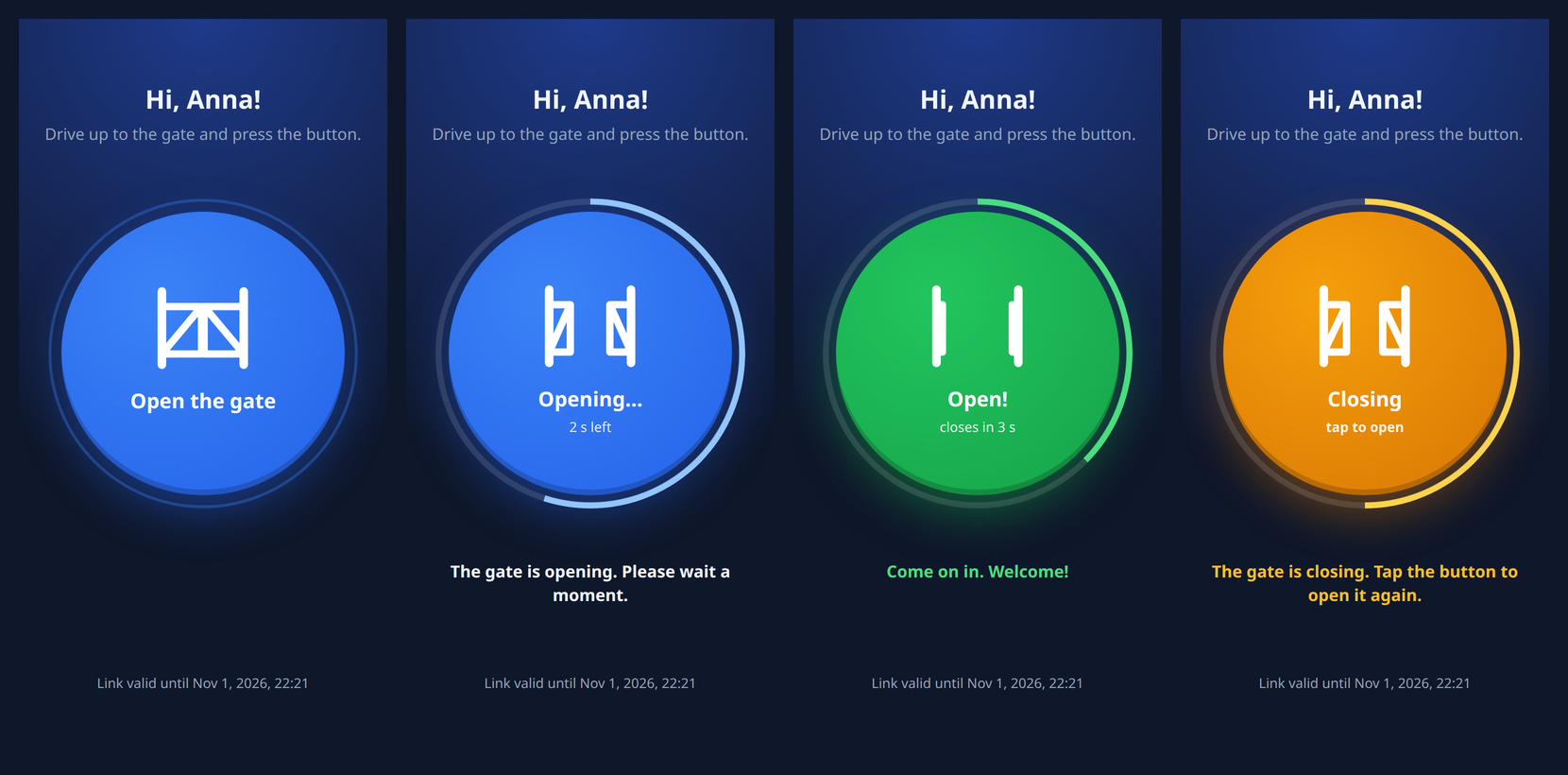
The gate doesn’t report its state. All I know is that it takes 25 seconds to open, stays open for 10 seconds, and takes another 25 to close. I asked for the icon to reflect that, and got:
- a gate icon whose leaves narrow as it opens, with a progress ring and a countdown,
- a button lock while the gate is opening or standing open.
The state of the cycle is kept by the server, not the browser, so refreshing the page or a second guest with the same link sees exactly the same thing. While the gate is closing, the button is active again, so anyone who doesn’t make it in time can open the gate once more. The cycle times are configurable (GATE_OPENING, GATE_OPEN_HOLD, GATE_CLOSING), so for a different gate you just need to time it with a stopwatch and enter the values.
Everything is nicely animated, clear and – most importantly – it works! I’m delighted :D
Who Opened the Gate?
I also wanted a notification about who opened the gate and when.
The webhook receives, as JSON, the guest’s name from the link, the link ID and the IP address. The automation in Home Assistant opens the gate, sends a notification to my phone and writes an entry to the logbook:
triggers:
  - trigger: webhook
    webhook_id: CHANGE_ME_WEBHOOK_ID
    allowed_methods: [POST]
    local_only: true
actions:
  - action: hassio.addon_stdin
    data:
      addon: CHANGE_ME_ha-sip
      input:
        command: dial
        number: sip:CHANGE_ME@sip.example.com
        sip_account: 1
        ring_timeout: 30
        menu:
          timeout: 15
          post_action: hangup
  - action: notify.mobile_app_CHANGE_ME
    continue_on_error: true
    data:
      title: Gate
      message: >-
        Opened by guest: {{ trigger.json.name | default('', true) or 'no name' }},
        {{ now().strftime('%Y-%m-%d %H:%M') }}
  - action: logbook.log
    data:
      name: Gate
      message: >-
        opened by guest {{ trigger.json.name | default('', true) or 'no name' }}
        (link {{ trigger.json.token_id | default('?') }}, IP {{ trigger.json.ip | default('?') }})
continue_on_error matters: a notification failure (e.g. when the phone is offline) must not abort the automation, so the following steps, like the logbook entry, still run.
Open Source
Since it works, maybe it will be useful to someone else.
If you have a gate that Home Assistant can open (not only via SIP, but in any way!), the code is on GitHub.
The repository includes ready-made deployments for Docker Compose and Kubernetes (Kustomize), a distroless image of about 10 MB for amd64, arm64 and armv7 (so it runs on a Raspberry Pi too), and a Polish and English interface, chosen according to the phone’s language.
Feedback and pull requests are welcome.